 Shoppex
The shop, inside the server.
The bot is on the free plan, all 41 slash commands included. Buyers link Discord at checkout, the role is usually granted within seconds of payment, and your staff run the shop from the server they already sit in.
Roles on purchase, granted for you.
Bind a product to a role on your server. The buyer links Discord at checkout, Shoppex adds them to the server and usually grants the role within seconds of payment.
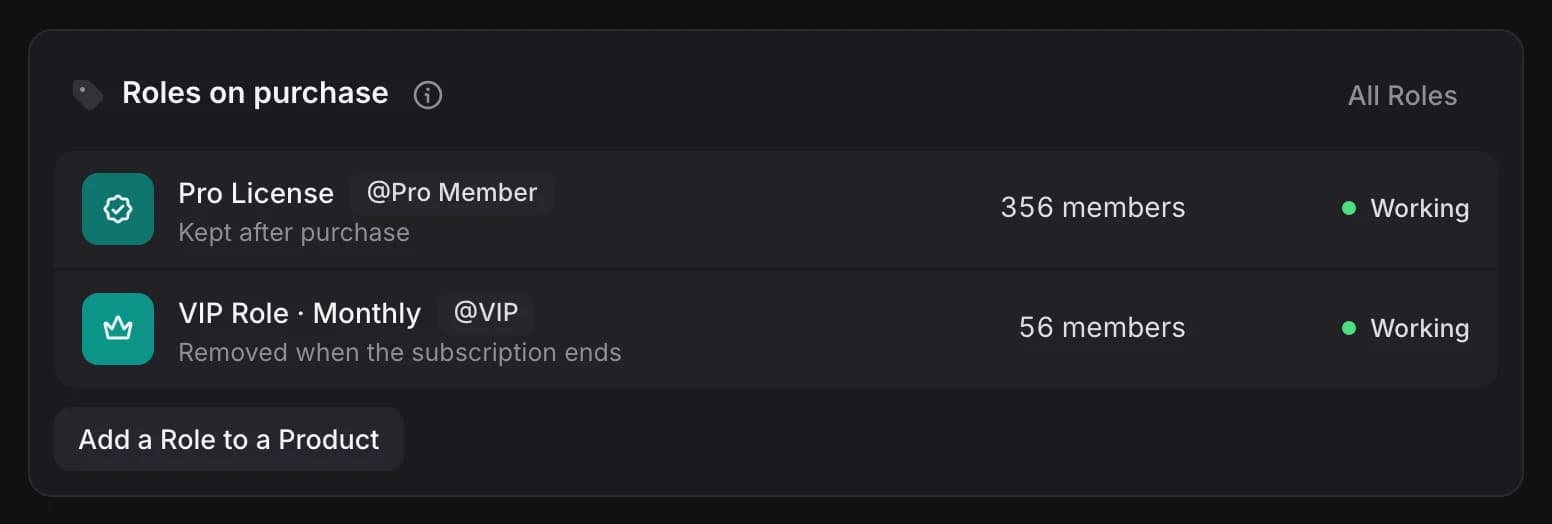
- Linked at checkoutMake the Discord link required before payment or leave it optional. If a buyer has not linked it, the role waits for the link.
- Retried if Discord is downMost grants land within a few seconds. If Discord is down or times out, Shoppex tries again after 1 minute, 5 minutes, 30 minutes and 2 hours.
- Subscriptions follow the planTurn on Remove role when subscription ends, and the role goes when the subscription ends. Another active subscription on the same role keeps it.
What a sale posts in Discord.
The public feed is built from an allowlist, so no customer field exists on it. Your own alert carries what you need to work a dispute.
- Low stock and restocksEach has its own channel, so stock alerts stay out of your sales feed.
- Owner and StaffOperators are named, and some commands stay owner-only.
- An audit logThe bot writes down every command it runs. A refund has a name on it.
New Sale
What buyers can watch.
- Product
- Amount
- Quantity
- Payment
Your shop's name in the footer.
New Sale
For your staff channel. Most fields with no data are left out.
- Product
- Quantity
- Total
- Gateway
- Coupon
- Order ID
- Customer
- Location
- IP
- Connection
- Fraud Score
- Signals
- Network
- Discord Username
- Invite Link
- Buyer Inputs
41 commands, one slash away.
Grouped by the job, and most of them are for you rather than for buyers. Revenue, stock, refunds, blacklist checks and webhook logs answer in Discord, so the dashboard can wait.
Buyers6
- /help
- /shop
- /sell
- /myorders
- /redeliver
- /vouch
Numbers10
- /revenue
- /topproducts
- /stats
- /analytics
- /traffic
- /paymentmethods
- /top
- /balances
- /affiliate
- /reseller
Orders & delivery7
- /orders
- /order
- /checkinvoice
- /giveproduct
- /replace_delivered
- /subscription
- /webhooklogs
Products & stock6
- /stock
- /product
- /notify
- /restock
- /product_hold
- /coupon
Buyers & support7
- /customers
- /customer
- /checker
- /feedback
- /feedback_restore
- /ticket
- /blacklist
Server5
- /operator
- /note
- /clear
- /giveaway
- /automations
Vouches from real orders.
A buyer runs /vouch, enters one of their own completed orders and rates it. The bot posts the review in the channel and saves it to your shop.
- Their own completed orders
The bot looks the order up on the buyer's linked Discord account. An order that is not completed is refused.
- No mass pings
@everyone, @here and role mentions inside a review are neutralised. Only the buyer's own mention resolves.
- Editable for 10 days
Running /vouch again for the same order updates the review.
/vouch
opens a form: enter one of your completed order IDs, give a rating, write the review✨ New vouch from @buyer
★★★★★ (5/5)
> the review, as the buyer wrote itDiscord FAQ
Is the bot on the free plan?
Yes. All 41 commands, the role grants and the four channels are on Free.
What does the bot need on my server?
The invite asks for Manage Roles, View Channels, Send Messages and Embed Links; /clear also needs Manage Messages. The bot's own role must sit above any role you sell, because Discord only lets a bot manage roles below its own.
What if a buyer skips the Discord link?
The role waits for the link. Under Channels, Discord you can email the buyer a link to connect it, and the role is granted then. You can also run a failed grant again there.
Who can run the staff commands?
Operators, either Owner or Staff. Owner-only: /customer, /checker, /blacklist, /balances, /giveproduct, /operator and /replace_delivered, plus /order refund, /subscription cancel, /feedback reply and appeal, /automations resume and resending an order email to a new address. Every command the bot runs goes into the audit log.
Invite the bot before the next drop.
Add it from Channels, Discord. Bind a role to a product, and the next buyer who links Discord gets it.