Features
Every feature, and the number behind it.
One checked line each, then the page that shows it running. Start with whatever you actually came here for.
Everything it does
08
- Storefronts
Six demo stores you can open right now: four you build by dragging blocks, two that hand you the React source.
- Payments
Cards, PayPal and 20+ cryptocurrencies, and every one of them settles on your own accounts.
- Instant Delivery
Keys, files and Discord roles handed over inside the payment confirmation, exactly once.
- Subscriptions
Renewals on your own Stripe or PayPal, a grace period you set from 1 to 30 days, and a reminder 7 days out.
- Resellers
Partners buy at the discount you set, from a balance they top up themselves.
- Discord
Forty slash commands, and the role lands with the payment instead of after it.
- AI Builder
Two or three versions of any section you describe, and two million tokens a day inside the platform fee.
- Developers
302 API operations, 59 signed webhook events, a CLI, and two MCP servers carrying 58 tools.
Make the cart bigger
09
Nine ways to raise the order total.
Every one of them is a screen in your dashboard with a switch on it. Nothing to install, nothing to pay a third party for, and they stack on the same cart.
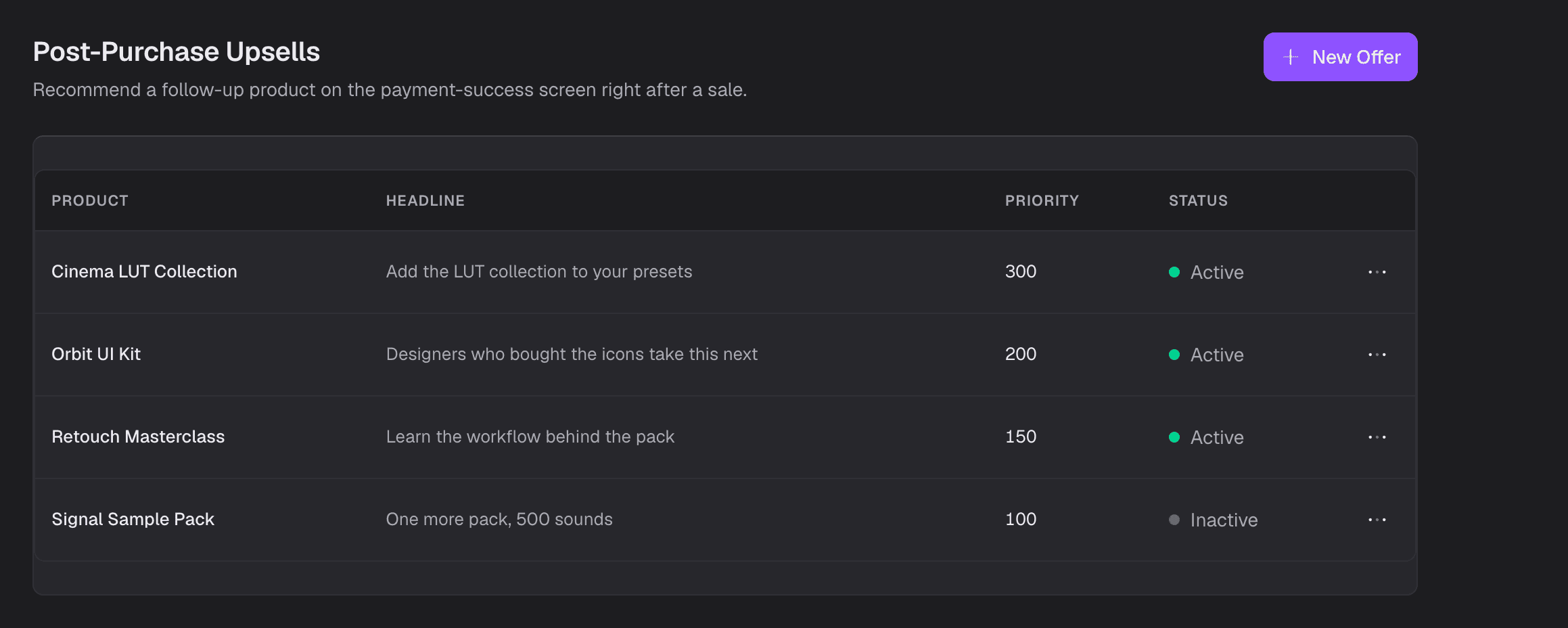
Post-Purchase Upsells
Offered on the payment success screen, and taking it opens a second checkout the buyer pays exactly like the first.
Add-ons
Order bumps you attach to a product, ticked at checkout with their own quantity.
Bundles
A percentage or a fixed amount off a set of products, with a start date, an end date and a cap per cart.
Buy X Get Y
Buy three, get the fourth free or at a discount, as many times per cart as you allow.
Store Promotions
Nothing to type at checkout. Exactly one runs per cart: the highest priority whose minimum the cart meets.
Coupons
Scoped to products, variants or categories, capped by uses, first order only, and limited to the gateways you allow.
Volume discounts
Cheaper per unit the more of it they take, set per product.
Pay what you want
You set the floor. The buyer decides the rest.
Checkout tips
5, 10 and 15 percent presets, and a box for whatever number they want.
Keep them coming back
05
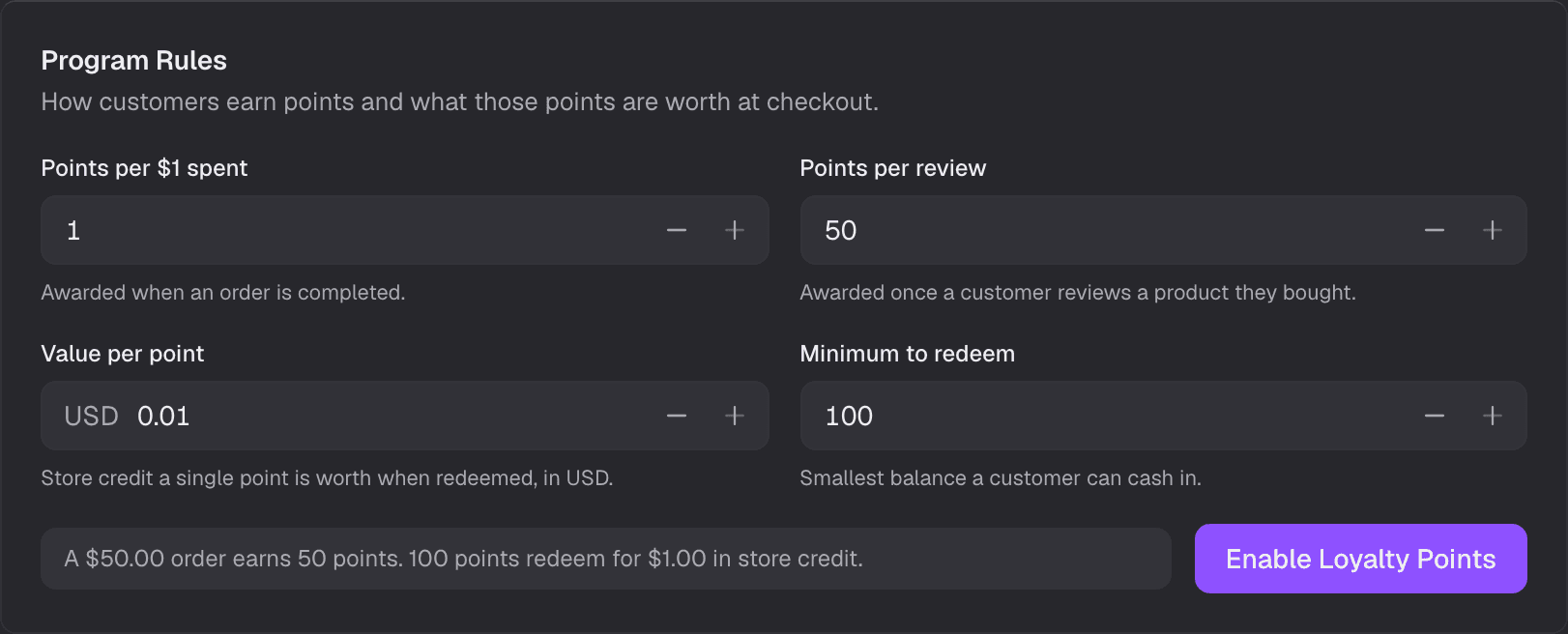
Loyalty Points
1 point per dollar, and 100 points to redeem.
Four numbers run the whole program: what an order earns, what a review earns, what a point is worth back, and the smallest balance a buyer is allowed to cash in. Points come back as store credit, so the money stays in your shop.
- Earned when the order completes
- Not when the cart is built and not when the payment starts. A refused payment earns nothing.
- Reviews can earn too
- Set a points award for a review and it lands once, on a product that buyer actually paid for.
- Cashed in from their account
- The buyer redeems in the customer portal and the balance arrives as store credit they spend with you.
Rewards Hub
Pick what earns it, pick what they get.
A rule is one trigger and one payout. Here are both lists in full, so you can count the combinations rather than take our word for the range.
Six triggers
- Order completed
- Order count reached
- Spend amount reached
- Positive review left
- First purchase completed
- Wallet top-up
Two payouts
- Store credit
- Coupon
Warranties
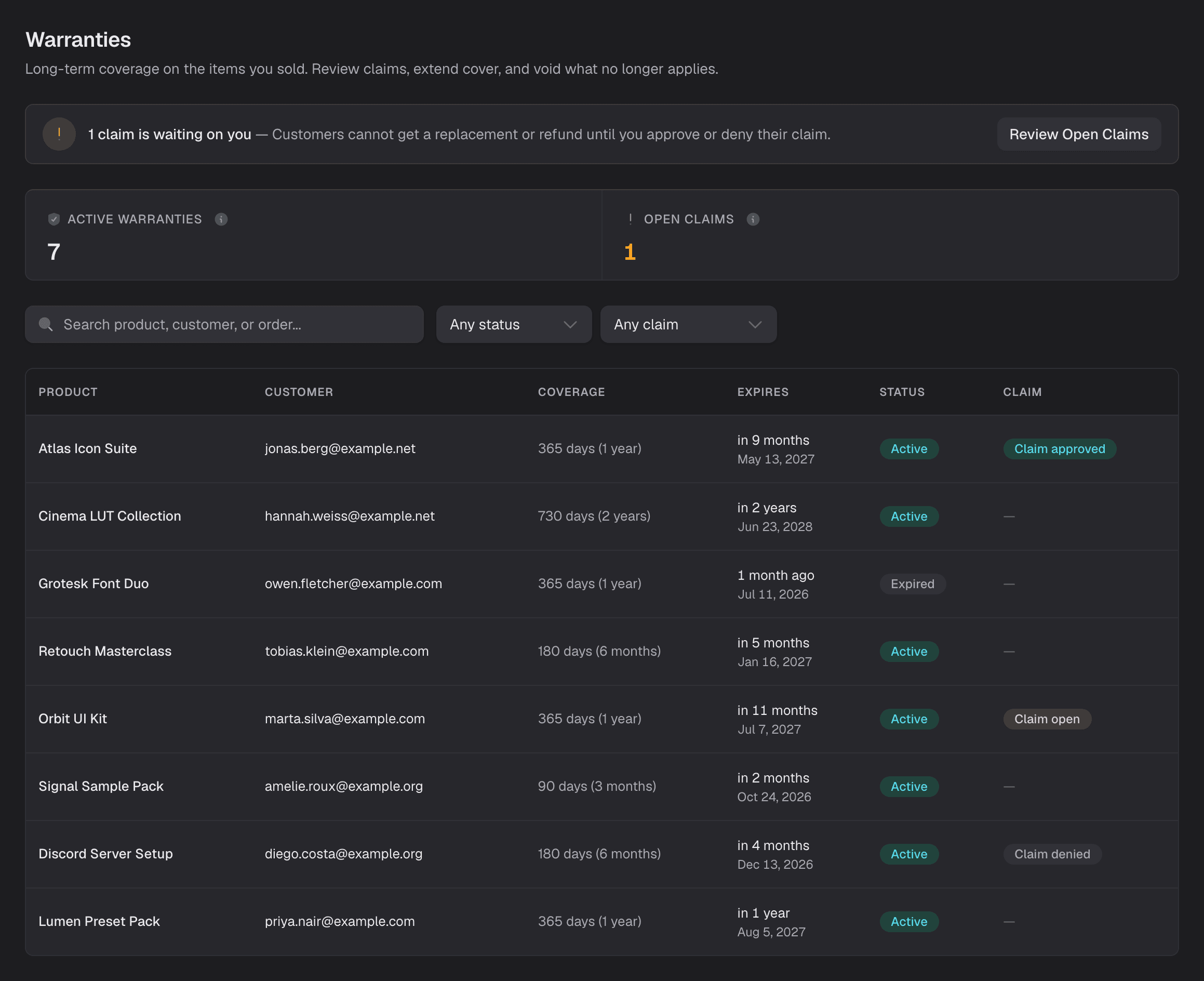
Every item you sell carries its own warranty.
Put a warranty period on a product and every sale of it gets covered the moment the payment completes. The length is copied at that moment, so changing the product next month leaves everything already sold exactly where it was.
- One row per item, once
- Coverage is keyed to the line item, so a retried completion can never hand the same buyer two warranties.
- Three claim states
- The buyer files from their account, and it sits at requested until you approve or deny it. You can also extend the cover or void it.
- Expiry is written, never guessed
- A sweep moves coverage to expired on the day it runs out, so the list you read is the list that is true.
Customer portal
Ten tabs your buyers run themselves.
They sign in with a code sent to their email, so there is no password for them to lose and none for you to reset. Behind it sits every ticket you would otherwise answer by hand: the order history, the downloads, a license renewal, a hardware reset, a paused subscription, a warranty claim, a points balance, and a store credit wallet they can top up themselves.
- Overview
- Orders
- Downloads
- Subscriptions
- Rewards
- Referrals
- Saved items
- Support
- Reseller
- Settings
Bring your own checkout
Headless checkout
Fourteen calls, and the buyer never leaves your site.
The whole checkout is an API you drive from your own page: open a session, tick an order bump, take a tip, then hand the payment to your own Stripe or PayPal. Nothing redirects, nothing is framed, and the session stays the authority on what was paid and what may be delivered.
POST /
x-shoppex-publishable-key: pk_live_…
Origin: https://your-store.com
{ "product_id": "orbit-ui-kit", "quantity": 1 }
200 { "data": { "id": "4e1c…", "amount": "39.00", "currency": "EUR" } }
POST /{id}/addons
{ "line_item_id": "8a03…", "addons": [{ "id": "b71e…" }] }
200 { "data": { "amount": "48.00", … } }
POST /{id}/tip
{ "mode": "percentage", "percentage": 10 }
200 { "data": { "amount": "52.80", … } }
POST /{id}/payment-session/stripe
200
GET /{id}
200 { "data": { "payment_status": "COMPLETED", "fulfillment_ready": true } }
- 01
Open the session
One product or a whole cart. The buyer is on your page and stays there.
- 02
Tick an add-on
The order bump attaches to a line item and the amount comes back changed.
- 03
Take a tip
A preset percentage or a number the buyer typed themselves.
- 04
Hand over to the gateway
Your gateway starts its own payment session. What it returns is its own.
- 05
Read the answer back
The session is the authority on whether the money landed and the delivery is unlockable.
Two things, both required
A publishable key that starts pk_live_, and a request from a domain you put on the allowlist. Your key ships in the browser bundle on purpose, and anyone who copies it out gets nothing from anywhere else.
Every call on a session
- create
- read
- update
- coupon
- tip
- addons
- free
- balance/request-otp
- balance/verify-otp
- balance/pay
- paypal/capture
- sumup/finalize
- payment-session/:gateway
- return-context
Run it like a company
08
- Your team
- Five roles and fifty permissions, plus a cap per person on the order value they are allowed to process. On the free plan.
- More than one shop
- Three shops on the free plan, and no limit on Business. Separate catalogues, separate payouts, one login.
- Reports that send themselves
- Revenue, orders, customers or products, daily, weekly or monthly, as a PDF or a CSV on a private link you can hand to an accountant.
- Tax and VAT
- EU rates plus any country you add yourself, VAT numbers validated at checkout, and prices that already include the tax.
- Payment rescue
- Turn it on and an abandoned checkout gets a link back 5 minutes later on a phone, 30 on a desktop. One automatic send, three in total.
- Access gates
- An age gate that ships at 18, and a password on the whole storefront while you are still building it.
- 16 languages
- Your storefront runs in sixteen, and every product carries its own title, description and highlights per language.
- Receipts and delivery mails on every order, and 50,000 marketing sends a month included on Business.
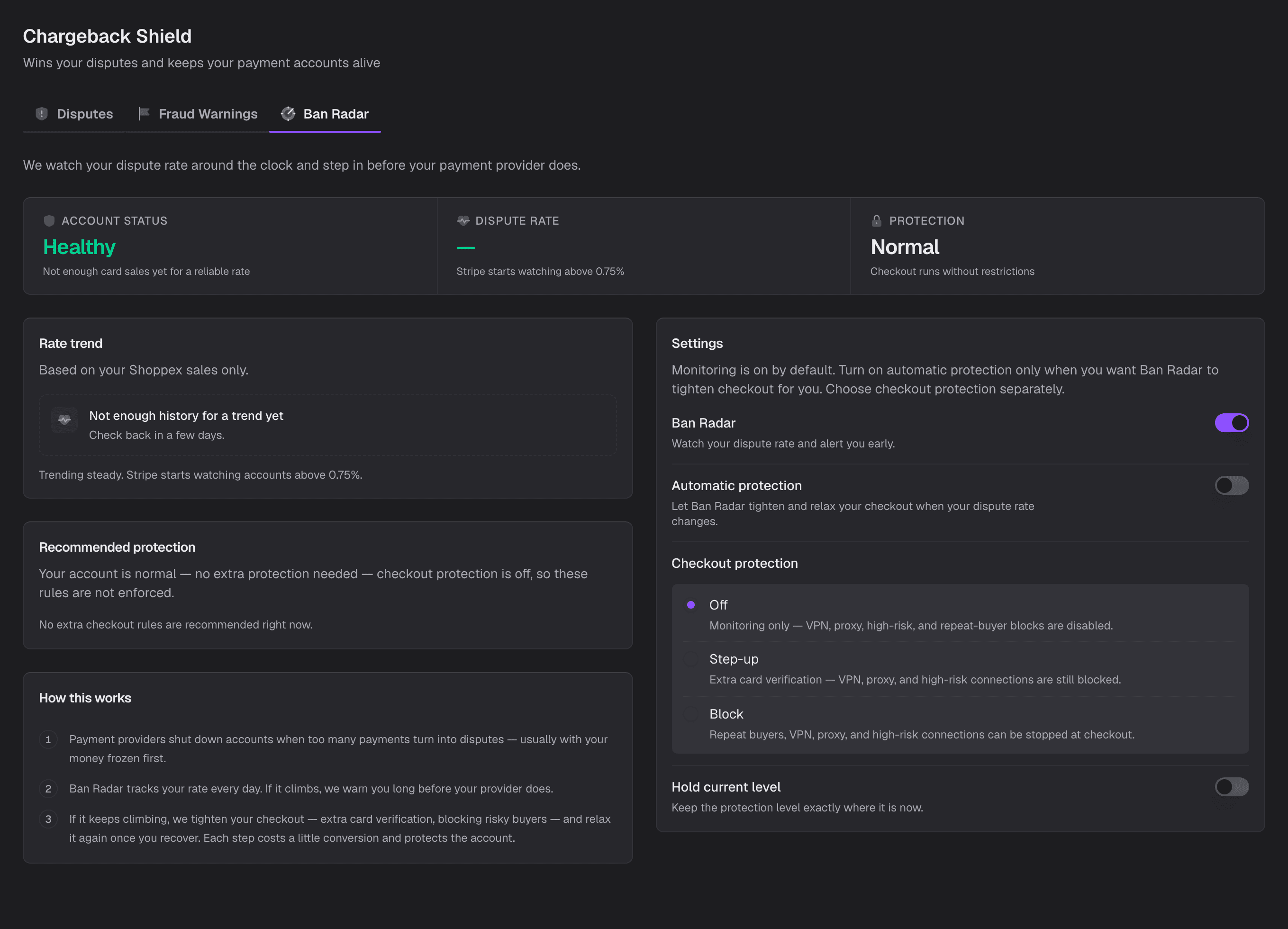
Anti-Fraud
Fraud Shield, Chargeback Shield, Ban Radar.
Sixteen ways to refuse an order before the payment form loads, and Ban Radar counts your dispute rate against the 0.75 percent line every day.
Put a product up and see.
Start on the free plan, connect your own Stripe or PayPal, and your first sale settles on your account.